
Find your kind
of journey.
A personal travel plan, shaped around your interests, your pace, and the little things that make a trip yours.

Less planning. More being there.
- Made for iOS
- No ads, no tracking
- Your first trip is free
A little planning.
A world of possibility.
From the first “where to?” to the last little detour. Tell Tralupo how you travel, and find your way through a trip that feels like you.

-
Make it yours.
Your interests, your pace, your travel needs. Start with what matters to you.
-
Find your rhythm.
Review a day-by-day itinerary, with a reason behind the places in it.
-
Leave room to wander.
Explore your plan. Choose a different stop when something else calls.
Slow mornings?
We’re with you.
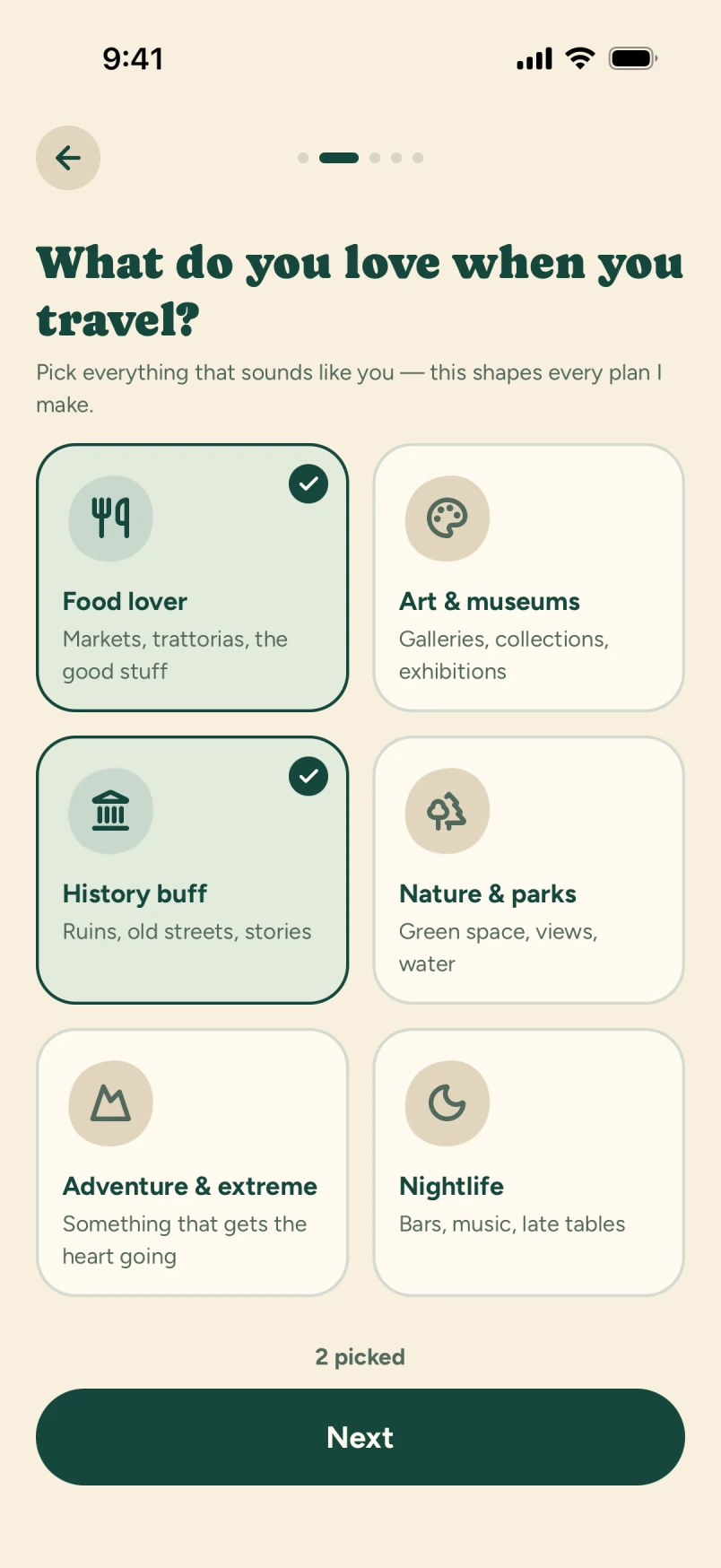
Or early starts and one more museum. A short interview gets to know your interests, your mornings, and how much walking feels like a good day.
Tralupo plays your answers back in plain language before it plans. Your saved profile gives the next trip a head start, too.
- Food, history, nature. Follow your curiosity.
- Plan around dietary and access needs.
- Change this trip without rewriting your profile.

Not just places.
A day that fits together.
A museum, a slow lunch, a little room between the two. See your stops in order, then switch to the map to get a feel for the day.
Times, places, and the reason each stop belongs: the details you need to spend less of your trip figuring out your trip.
- Keep your must-dos locked when you adjust the plan.
- Your saved plan stays readable, even without a signal.
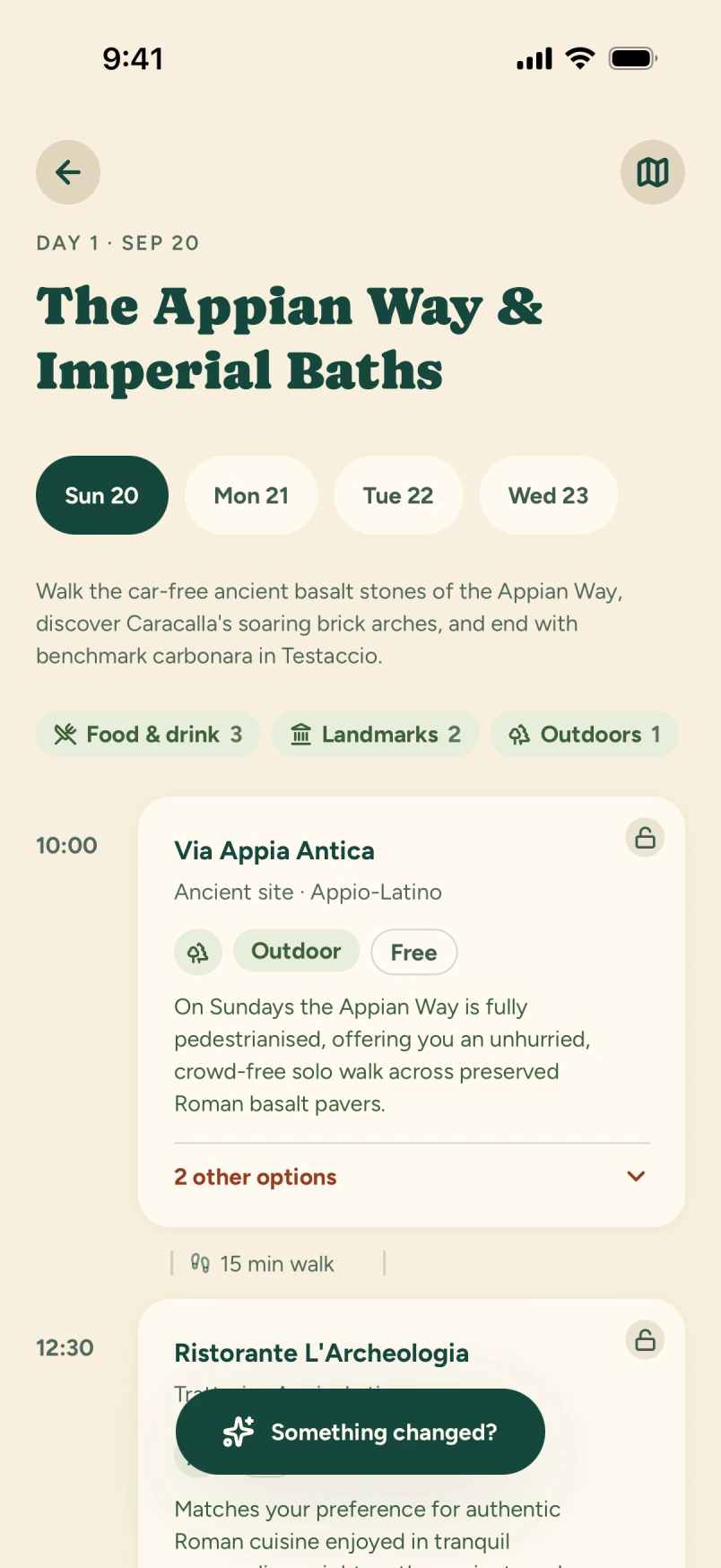
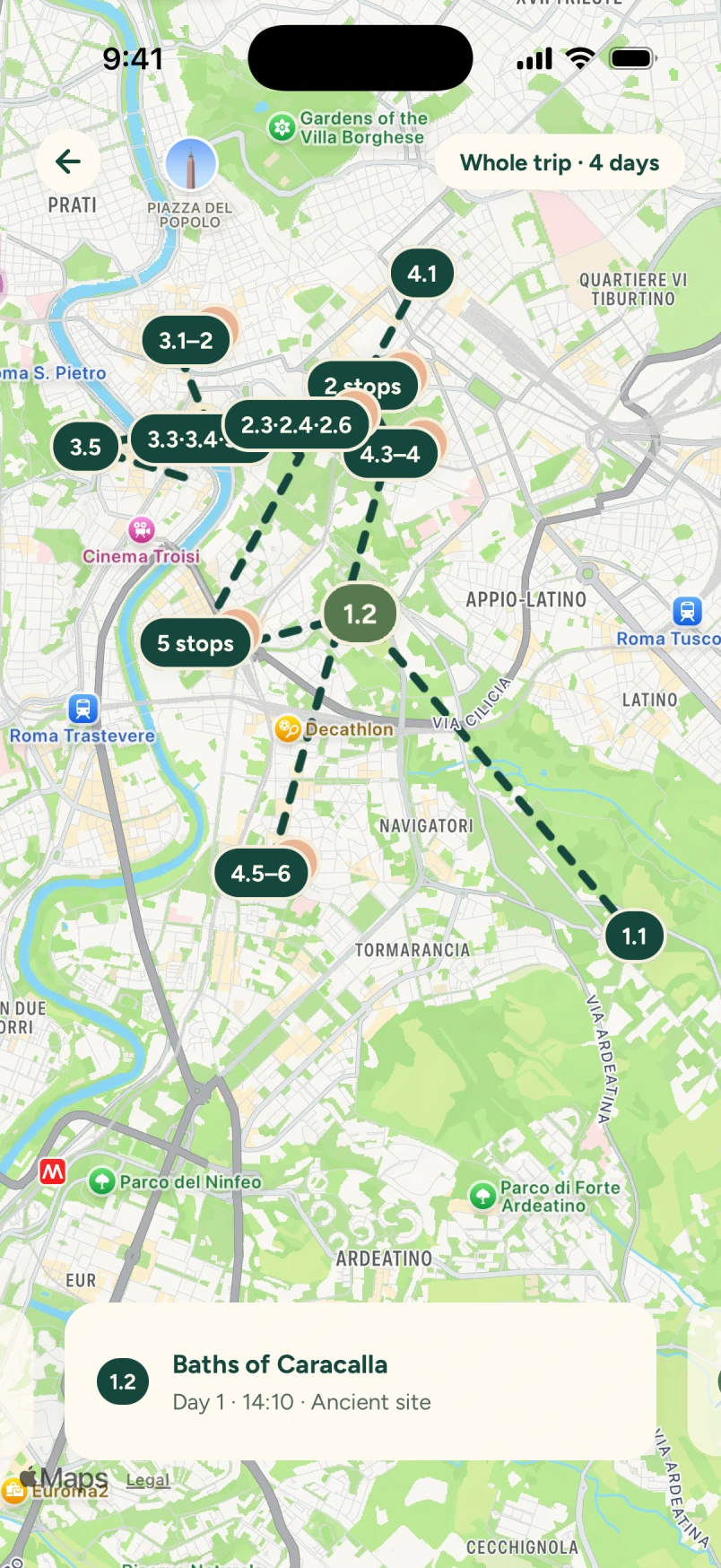
Actual app screens · A sample trip to Rome
A detour.
Not a do-over.
Found something more your kind of thing? Ready alternatives let you change one stop without rebuilding the day. You choose what changes.
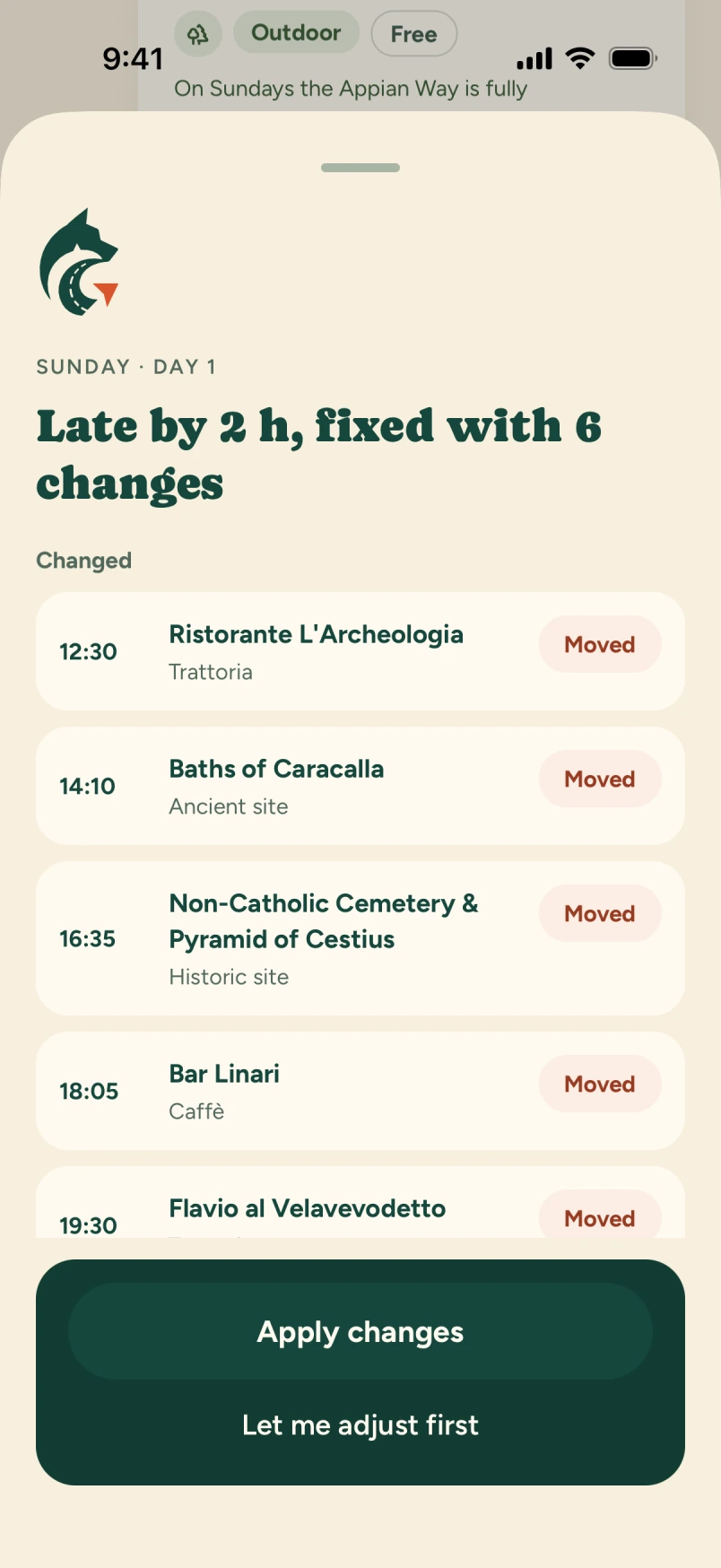
Running late? Ask for a revised day, review the changes, then decide whether to apply them.

Change one stop.
Keep the day.
Give the museum a swap. Lunch and the gardens stay right where they are. Go on, try it.
One afternoon in Rome. Two ways to make it yours.
You can always swap back.
Your day, your call.
Sculpture, frescoes, and a quiet courtyard.
Try a ready alternative. The rest of your day stays put.
A taste of the place.
A reason it’s for you.
Good recommendations should come with a why. See what makes a stop fit your trip, rather than another list of popular places to work through.
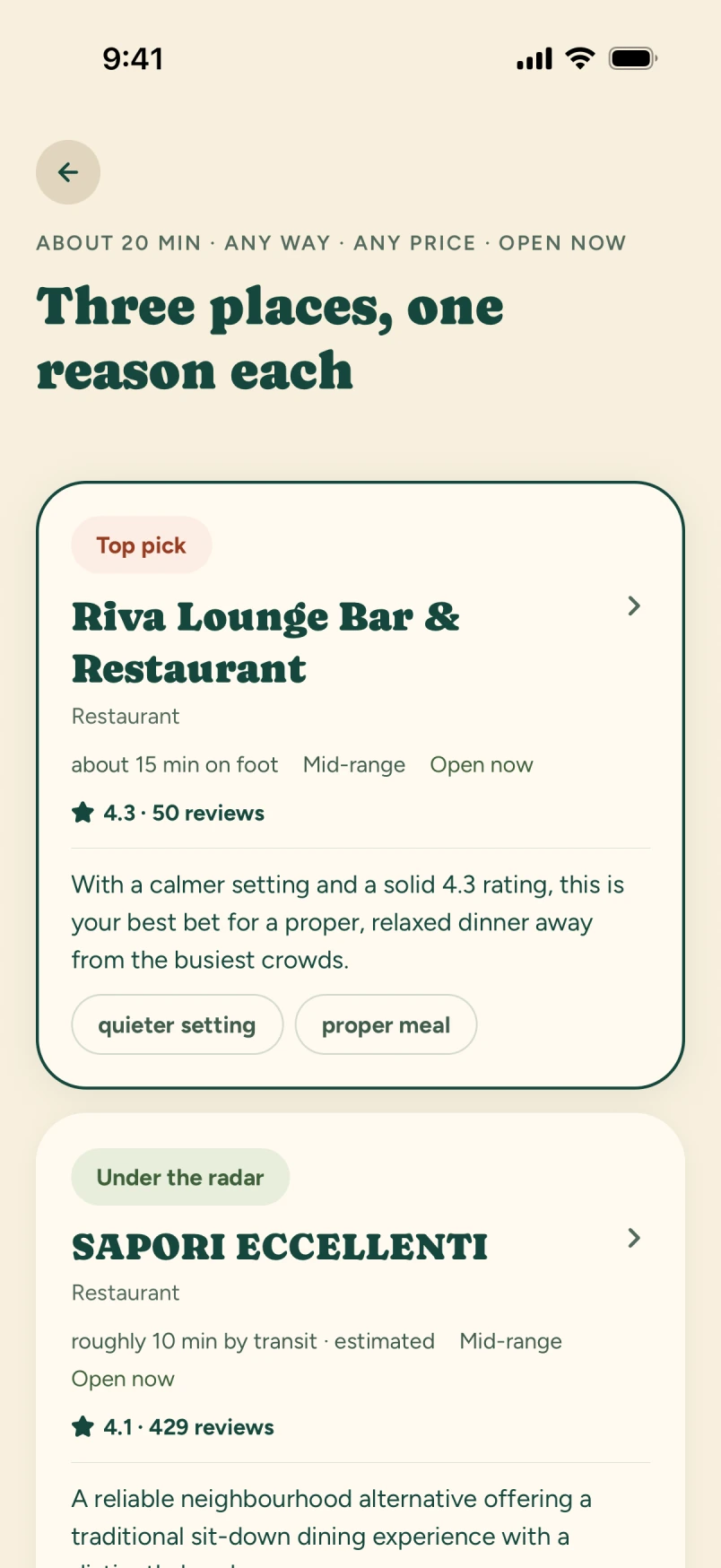
Hungry right now? Explore three nearby food suggestions, each with a reason to go. A little less searching. A little more being there.
Suggestions are a starting point. Always check opening hours, reservations, and allergy or access needs with the venue.

What the AI does,
and what it doesn’t.
Tralupo is built on a language model, so here is the honest version , the same three things we’d want to know before trusting an app with a holiday.
Current destination research in version 1.0
Parallel retrieves destination information from web sources, then Gemini uses relevant excerpts to help draft the plan. Gemini’s Google Search Grounding tool is disabled, and Parallel does not receive your identity, party or profile answers. Always verify time-sensitive details yourself.
Check the hours before you go
A generated plan is a strong first draft, not a guarantee. A model can get opening hours, prices and walking times wrong, and Tralupo books nothing on your behalf. Confirm anything that matters with the venue, especially closures, tickets, and allergy or access needs.
You choose each swap
Tralupo never changes a generated stop automatically. Ready alternatives are shown for you to review, and the plan changes only after you choose one.
The full detail on providers, storage, retention, and deletion is in the privacy policy, and the limits of what a generated plan is are in the terms.
Before you ask.
What does it cost?
Your first generated trip is free. After that, Premium covers further trips, or you can buy a single trip. The App Store purchase sheet shows the current price and terms before you pay.
Is there an Android version?
Not at launch. Tralupo is iOS-first, and doing one platform properly comes before doing two badly.
Does it book anything for me?
No. Tralupo plans; you book. A generated stop may note that a ticket or reservation is needed, but Tralupo never transacts with a venue on your behalf.
What does it keep about me?
Your email (held by our authentication provider), an optional name, date of birth and home country, your trips, your questionnaire answers, and the plans it generates. Vibe asks for optional foreground location permission to find nearby food. There is no camera or contacts access, and it runs no advertising or tracking SDK. The full list is in the privacy policy.
Can I delete everything?
Yes. Deleting your account removes your profile, your answers, your trips, the generated itineraries and the generation records behind them. See deleting your account.
Do I need a signal while I travel?
Not to read your plan. Your active trip is stored on the device, so days, places and times stay readable offline. Generating a plan needs a connection.
The world is out there.
Find your way into it.
Tell Tralupo how you travel, then explore an itinerary built around you.

Your first generated trip is free. Available now on the App Store.